# Facilities
# MLML Facilities Service Request Walkthrough ( WebTMA)
### Navigating To and Using WebTMA
##### **Background**
##### Moss Landing Marine Labs (MLML) has used the NetFacilities application for facilities request submissions in previous years. The use of NetFacilities has been inconsistent and the application is limited in capability. NetFacilities does not have individual log-ins or a simple submission process. Additionally, the general design and function of NetFacilities is limited relative to comparable applications on the market, and NetFacilities represents an additional cost to MLML.
##### San Jose State University (SJSU) Facilities Development & Operations (FD&O) has used the WebTMA facilities ticketing system for many years to manage the main campus facilities requests, work orders, and documentation of their resolution. The design and functionality of WebTMA allow for flexibility in use across departments, facilities, buildings, and rooms. Additionally, this system affords the MLML Facilities team to manage the requests, work orders, scheduling, technician assignment, and documentation in real time.
##### While WebTMA is a complex application with a variety of functions, WebTMA also allows anyone with SJSU credentials (i.e. Tower ID number) to log-in using the single sign on (SSO) portal to submit a Facilities service request using a simple form to kick-off the work order process.
#### MLML Facilities Service Request Process
• Navigate to [One.SJSU.edu](https://one.sjsu.edu/)
• Select **Sign In** and navigate the normal **SSO process.**
[](https://kb.mlml.sjsu.edu/uploads/images/gallery/2025-02/webtma1.png)
[](https://kb.mlml.sjsu.edu/uploads/images/gallery/2025-02/webtma2.png)
• Search for **“FD&O”** in the search field at the top of the page.
[](https://kb.mlml.sjsu.edu/uploads/images/gallery/2025-02/webtma3.png)
• Find the **FD&O Service Request Tile** in the search results. To add the tile to your **My Favorites**, click on the outline of the red heart (full heart is already saved in your My Favorites).
[](https://kb.mlml.sjsu.edu/uploads/images/gallery/2025-02/webtma4.png)
• Click on the **FDO Service Request Tile** to be taken to WebTMA’s **FD&O Service Request** landing page.
Select the **Campus Maintenance Request** link.
***Note:** As discussed above, WebTMA access is managed through the SJSU Single-Sign On portal. Individuals with SJSU Tower ID credentials should have access to this request page. If you do not, please [open an IT ticket with the MLML IT team](https://isupport.sjsu.edu/mlml/Dashboard).*
[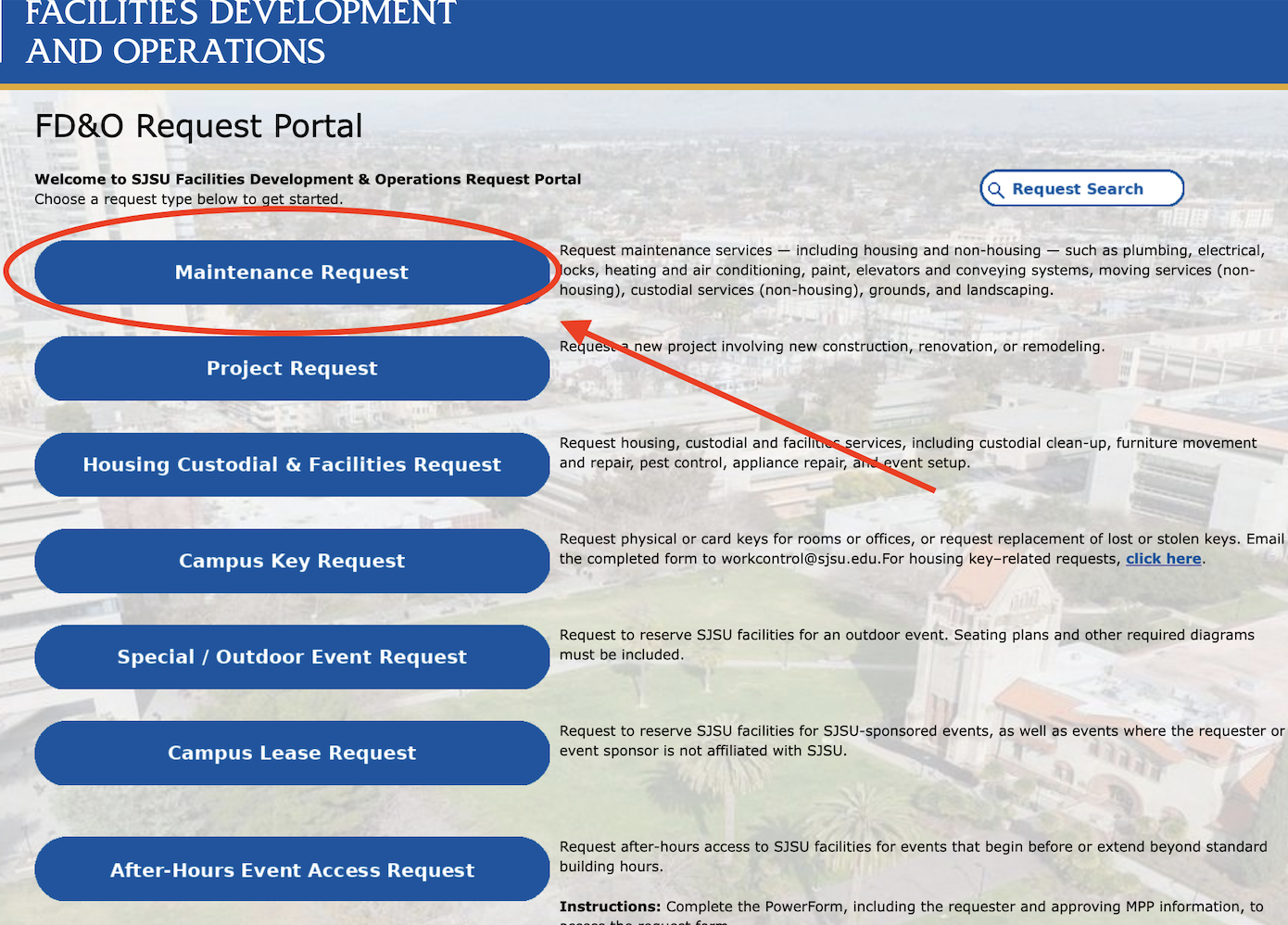](https://kb.mlml.sjsu.edu/uploads/images/gallery/2026-04/maintenancerequest.png)
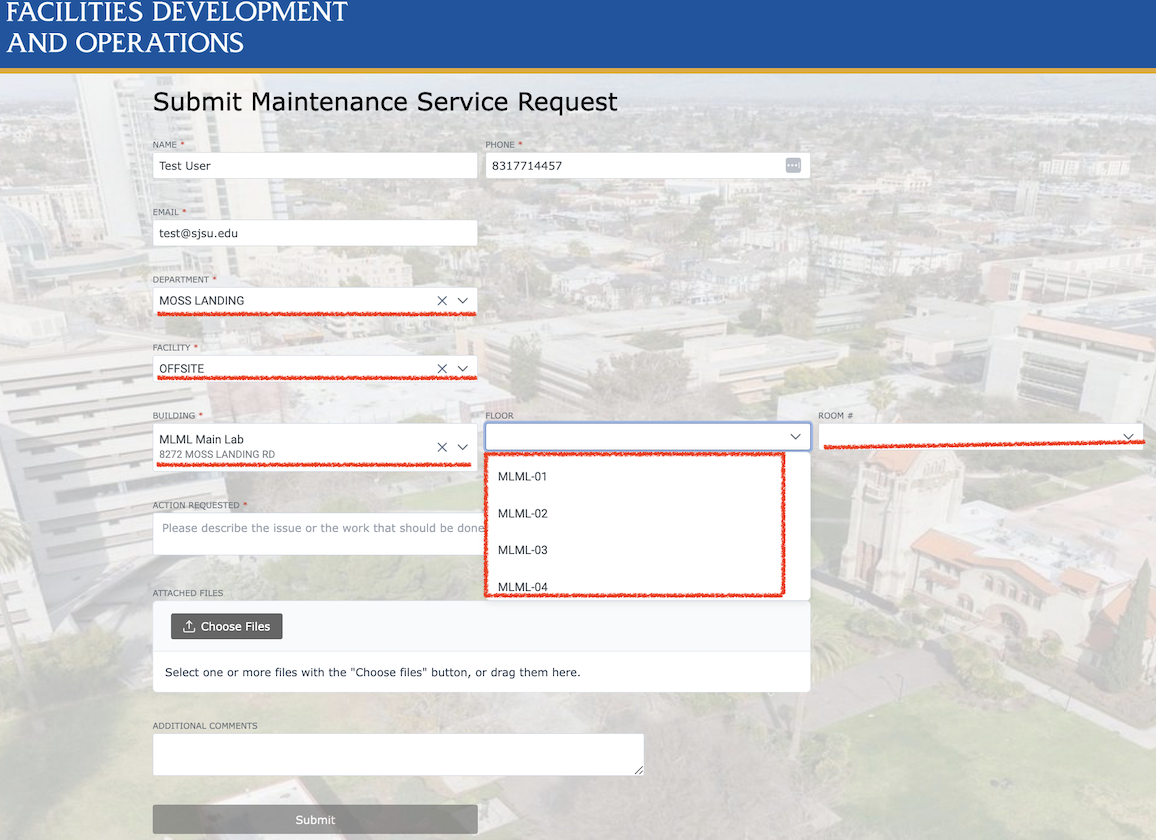
• This link will take you to the **FD&O Campus Maintenance Request form.**
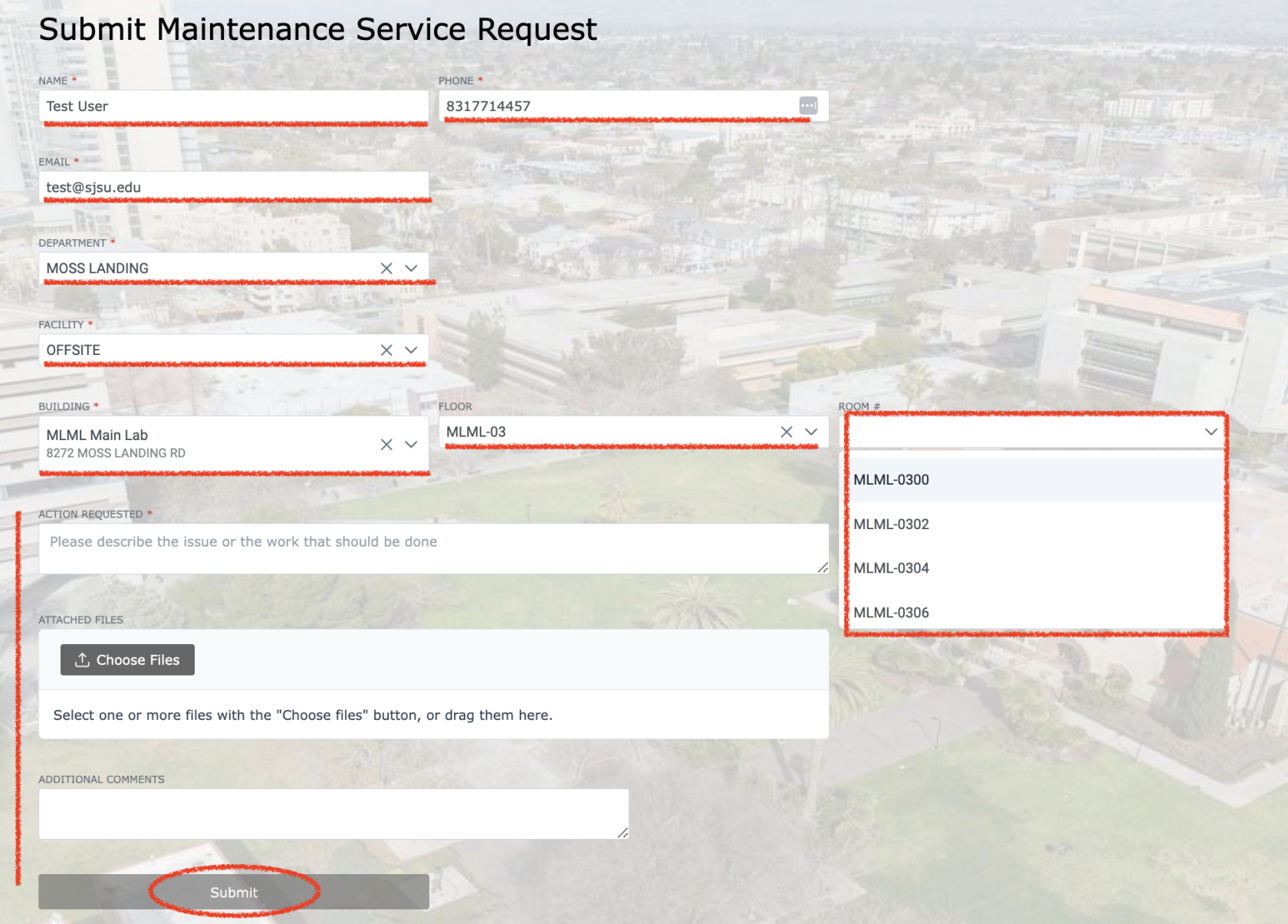
Form fields include the following:
• Name**\***
• Phone #**\***
• Email Address**\***
• Department**\* > (Moss Landing)**
• Facility**\* > (OFFSITE)**
• Building**\* > (MLML Del Norte, Main Main Lab, etc.. )**
• Floor & Room **\*** > **Choose based on room number: MLML-01 (100s), MLML-02 (200s), MLML-03 (300s), MLML-04 (400s), MLML-05 (500s).**
• Action Requested**\***
***\* Required fields***
[](https://kb.mlml.sjsu.edu/uploads/images/gallery/2026-04/request.png)
[](https://kb.mlml.sjsu.edu/uploads/images/gallery/2026-04/screenshot-2026-04-17-at-10-09-50-am.png)
• Reference the **MLML Building Floor Plans** to identify the relevant room.
[](https://kb.mlml.sjsu.edu/uploads/images/gallery/2025-02/webtma13.png)
[](https://kb.mlml.sjsu.edu/uploads/images/gallery/2025-02/webtma20.png)
Later, you will receive an email confirmation when the service request has been converted to a work order and assigned to the MLML Facilities Supervisor for review and scheduling.
[](https://kb.mlml.sjsu.edu/uploads/images/gallery/2025-02/webtma21.png)
Need more help? >>>> [Submit a help ticket!](https://isupport.sjsu.edu/mlml/Dashboard) We’re here to help you.